Can I Cancel Semrush Free Trial? How to Cancel Before You Get Charged
Wondering Can I Cancel Semrush Free Trial? Learn how to cancel your Semrush free trial, avoid unwanted charges, and keep access to your free account.
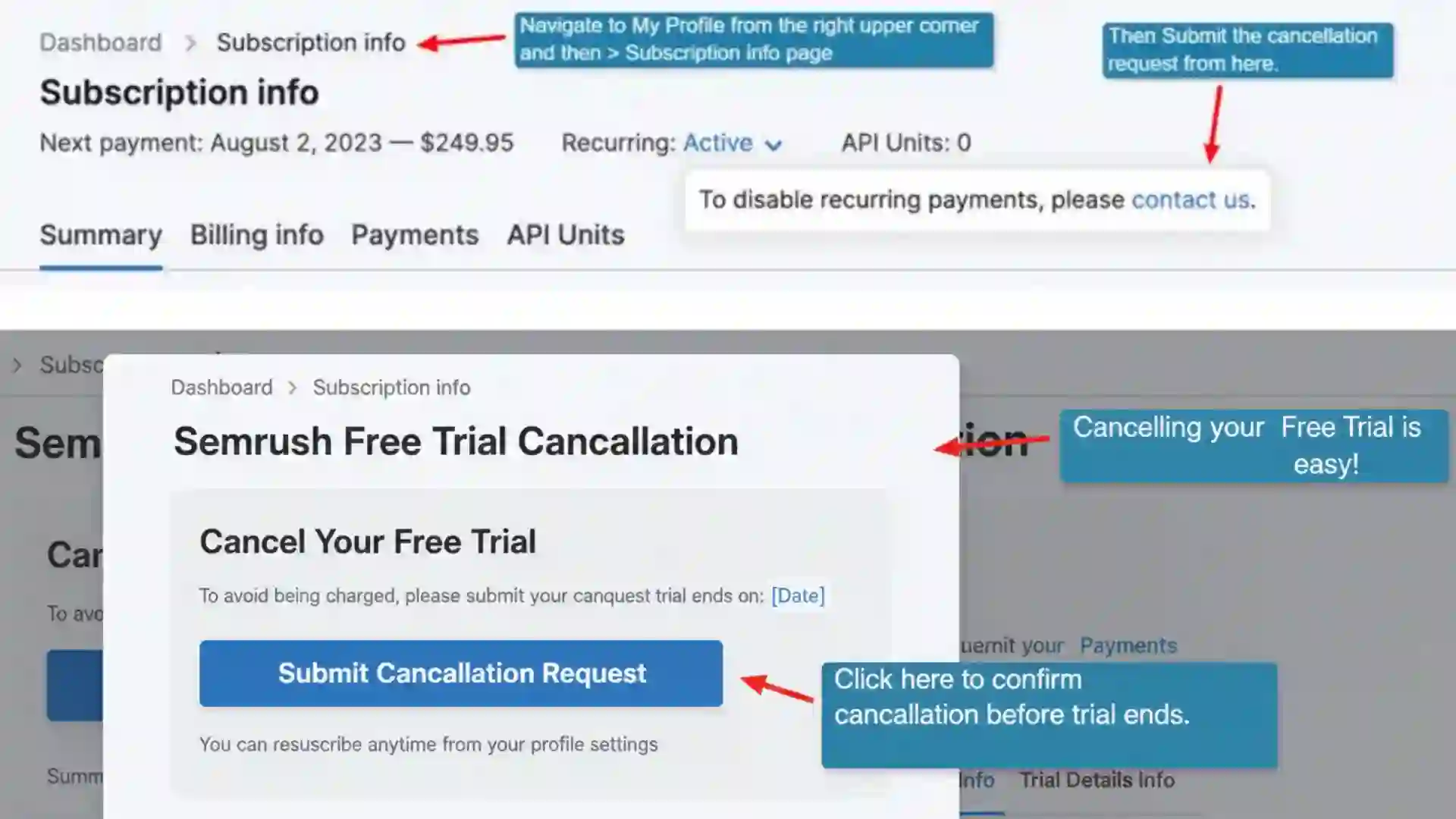
Can I Cancel Semrush Free Trial? A Complete Guide to Canceling Before You Get Charged
If you are wondering, Can I Cancel Semrush Free Trial, the short answer is yes. Semrush allows users to cancel an eligible free trial before it ends, and canceling before the trial expires can help you avoid being automatically charged for the paid subscription.
Semrush currently offers free trials for several of its toolkits. Most standard toolkit trials last seven days, although the availability and duration of a particular trial can vary depending on the product or offer. Semrush states that you can cancel a free trial at any time before it ends.
This is particularly important if you signed up for Semrush using a credit card or another payment method. According to Semrush's current terms, a paid subscription can begin automatically when the trial period ends unless you cancel before the trial expires.
In this guide, we will explain Can I Cancel Semrush Free Trial, when you should cancel, how the cancellation process works, what happens to your account afterward, whether you can continue using Semrush for free, and what to do if you were already charged.

Semrush Guru Trial — 14 Days Free
Try the Semrush Guru plan for free for 14 days. Test out all the amazing features for free!
Can I Cancel Semrush Free Trial?
Yes, you can cancel your Semrush free trial.
Semrush specifically states that eligible free trials can be canceled at any time before the trial period ends. If you cancel during the trial, you can avoid moving into the paid subscription associated with that trial.
The most important thing is timing. If your trial is scheduled to convert into a paid subscription, you should complete the cancellation process before the trial expiration date.
Simply deciding not to use Semrush is not necessarily the same as canceling your trial. You should actually submit the cancellation request and make sure you receive confirmation that the cancellation has been completed.
Semrush's cancellation instructions explain that users can cancel through its cancellation form. After submitting the request, Semrush sends a confirmation email containing a confirmation link. You need to click that confirmation link to finalize the request.
How Long Is the Semrush Free Trial?
As of the current Semrush trial information, most Semrush toolkits offer a seven-day free trial. Semrush lists free trials for products such as Semrush One, SEO, Traffic & Market, Local, Content, Social, Advertising, and AI PR Toolkits.
There are exceptions. For example, Semrush lists a 14-day trial for its Agency Partners Platform add-on, while some products may not offer a traditional free trial.
Because trial offers can change, always check the trial information shown when you register.
For most users, however, the important rule is simple: check the exact expiration date displayed in your Semrush account and cancel before that date if you do not want to continue with the paid plan.
What Happens If I Cancel My Semrush Free Trial?
When you cancel your trial, you are telling Semrush that you do not want the trial to continue into a paid subscription.
Semrush's billing FAQ says that after canceling a subscription or trial, users can still access Semrush through a free-level account. However, the free account has significantly reduced limits and access compared with paid plans.
This means cancellation does not necessarily mean that your entire Semrush account disappears immediately.
Instead, your account may remain available at the free level, while premium trial features and limits are removed.
This can be useful if you want to keep using basic Semrush features without paying for a subscription.
How to Cancel Semrush Free Trial?
If you want to cancel your trial, follow these general steps.
Step 1: Log In to Your Semrush Account
Go to the Semrush website and sign in using the account associated with your free trial.
Make sure you are using the correct account, especially if you have more than one Semrush account.
Step 2: Open the Cancellation Process
Semrush provides a cancellation form for subscriptions and trials. Its current cancellation instructions direct users to complete the cancellation form and confirm their decision.
Step 3: Submit Your Cancellation Request
Complete the requested information and submit the cancellation request.
Make sure all required questions are answered correctly. Semrush's cancellation and refund policy states that the user must be logged into the User Account when submitting a cancellation request, and failure to provide the required information can cause problems processing the request.
Step 4: Check Your Email
After submitting the request, look for an email from Semrush asking you to confirm the cancellation.
According to Semrush's cancellation instructions, the confirmation link is valid for 24 hours. You must click the confirmation link to finalize the request.
Step 5: Save the Confirmation
Once the cancellation has been completed, keep the confirmation email for your records.
This is especially useful if your trial is close to expiration.
When Should I Cancel My Semrush Free Trial?
The safest approach is to cancel before the last day of the trial rather than waiting until the final few minutes.
If your free trial expires on a particular date, consider submitting your cancellation request earlier. This gives you time to complete the email confirmation process and deal with any unexpected problems.
Semrush's terms explain that paid services can automatically convert to a paid subscription at the end of a trial. To avoid those fees, you must cancel before the applicable trial period ends.
For this reason, don't rely on simply deleting the Semrush app, stopping your usage, or ignoring your account.
Actually complete the cancellation process.
Can I Cancel Semrush Free Trial on the Last Day?
You may be able to cancel on the last day, but it is better not to wait.
The cancellation process can involve submitting a request and confirming it through email. Semrush's current instructions state that the email confirmation link is valid for 24 hours, and the cancellation is not finalized until the confirmation step is completed.
If you wait until the final moments of your trial, you could run into an issue such as not receiving the email immediately, forgetting to confirm the cancellation, or misunderstanding the trial expiration time.
Therefore, if you already know you don't want the paid plan, canceling earlier is the safer choice.
Will Semrush Charge Me After the Free Trial?
If you do not cancel the trial, Semrush may automatically convert the trial into the paid plan you selected.
Semrush's current Terms of Service state that at the end of a trial period for paid services, the user will be automatically charged the applicable fees unless the subscription is canceled before the trial period ends.
This is why the question Can I Cancel Semrush Free Trial is important for anyone who signs up simply to test the platform.
A free trial is designed to give you an opportunity to evaluate the service. If you decide that you do not need the paid subscription, cancel before the trial ends.
What If I Already Got Charged?
If your trial has already ended and you were charged, the situation is different from canceling before the trial expires.
You should cancel the subscription as soon as possible to prevent another renewal.
Semrush's cancellation policy says that users can cancel their subscription at any time. However, cancellation and refund eligibility are separate matters.
Semrush currently provides a specific seven-day money-back guarantee for qualifying initial annual subscriptions purchased directly from Semrush.com using a credit card. The policy does not provide the same refund arrangement for month-to-month subscriptions.
Therefore, if you were charged after a trial, do not assume that canceling automatically means you will receive a refund.
Instead, review the applicable refund rules and submit a refund request if you believe you qualify.
Can I Get a Refund After Canceling Semrush?
Cancellation and refunds are two different processes.
Canceling your account generally prevents future renewal, but it does not automatically mean that previously charged fees will be refunded.
Semrush's current refund policy states that qualifying initial annual subscriptions may be eligible for a one-time seven-day money-back guarantee, subject to the conditions in the policy.
If you are requesting a refund, make the refund request explicitly rather than assuming cancellation will automatically trigger one.
Your eligibility may depend on factors such as the type of subscription, when you purchased it, where you purchased it, and the payment method.
Can I Continue Using Semrush After Canceling?
Yes, Semrush says that users can continue using the platform through a free-level account after canceling a subscription or trial.
However, free access is much more limited than paid access.
You may have lower usage limits and reduced access to reports, tools, searches, and other features.
This can still be useful if you only need occasional SEO research and don't want to maintain a paid subscription.
What Happens to My Semrush Data After Cancellation?
Cancellation does not necessarily mean that everything disappears immediately.
Semrush's billing FAQ explains that some data associated with paid features can remain visible for a limited period. For example, Website Monitoring folders created under paid limits can become locked while remaining displayed, and Semrush describes a 30-day grace period for that monitoring data if the subscription is renewed within that period.
If you have important projects, reports, or information in your account, it is a good idea to review and save anything you need before canceling.
Keep in mind that free-plan limits can affect what remains available after cancellation.
Does Canceling Delete My Semrush Account?
No. Canceling a trial or subscription is not necessarily the same as deleting your entire Semrush account.
Semrush's billing information indicates that after cancellation, users can continue with a free-level account.
If you want to completely delete your account, that is a separate process.
Semrush's Terms of Service state that users can request account deletion through its support process. The terms also warn that deleting an account may result in deletion of data stored on Semrush's servers.
Therefore, don't delete your account simply because you want to stop the free trial. Canceling the trial is usually the more appropriate action.
Important Semrush Free Trial Information
| Information | Details |
|---|---|
| Focus keyword | Can I Cancel Semrush Free Trial |
| Can you cancel the trial? | Yes |
| Standard trial duration | Most current toolkit trials are 7 days |
| Cancellation timing | Cancel before the trial ends to avoid the paid conversion |
| Automatic billing | A trial can convert to a paid subscription if not canceled |
| Cancellation method | Semrush cancellation form |
| Email confirmation | Required to finalize the cancellation |
| Free account after cancellation | Yes, with reduced limits |
| Refund after cancellation | Depends on the applicable refund policy |
| Current qualifying money-back policy | One-time 7-day guarantee for qualifying initial annual subscriptions |
| Best time to cancel | Before the final day of the trial |
| Account deletion | Separate from trial cancellation |
Important Semrush Links and Information
| Resource | What It Is Used For |
| Semrush Free Trial | Check current trial options and available toolkits |
| Semrush Cancellation Guide | Learn how to cancel a trial or subscription |
| Semrush Billing FAQ | Review billing, cancellation, account, and refund information |
| Semrush Cancellation & Refund Policy | Check the official cancellation and refund rules |
| Semrush Terms of Service | Review subscription and automatic renewal terms |
| Semrush Contact Page | Contact Semrush or access customer support |
Common Mistakes to Avoid When Canceling Semrush
One of the biggest mistakes is assuming that you will not be charged simply because you stop using the platform.
Not using Semrush does not necessarily cancel your subscription.
Another common mistake is submitting the cancellation form but forgetting to confirm the cancellation through the email Semrush sends you. Since Semrush's cancellation process requires email confirmation, you should complete that step.
Another mistake is waiting until the final hour of the trial.
If you already know you don't want Semrush, cancel early. There is generally little benefit to waiting until the last possible moment.
You should also check which toolkit you actually signed up for. Semrush currently offers trials for multiple toolkits, and trial availability can vary between products.
Finally, keep your cancellation confirmation. It gives you a record that you completed the process.
Is It Better to Cancel Semrush Immediately or Near the End of the Trial?
This depends on what you want.
If you want to use Semrush for the maximum possible trial period, you may choose to continue using it until shortly before the trial ends.
However, if your primary concern is avoiding an unexpected charge, canceling earlier provides additional peace of mind.
Before canceling, you can use the trial to explore keyword research, competitor analysis, domain analysis, backlink information, site auditing, content tools, and other features included in your particular trial.
Once you have finished testing the features you need, you can cancel rather than waiting for the trial to expire automatically.
Can I Cancel Semrush Free Trial Without Losing My Account?
Generally, yes.
Canceling the trial and deleting the account are separate actions. Semrush says that after canceling a subscription or trial, users can continue using a free-level account with reduced functionality.
This means you can stop the paid conversion while potentially retaining access to a basic Semrush account.
If you later decide that you need premium features, you can consider upgrading again.
Conclusion
So, Can I Cancel Semrush Free Trial? Yes, you can.
Semrush allows eligible users to cancel their free trial before it ends. Most current Semrush toolkit trials are seven days, although the exact trial offer can vary depending on the product.
The most important thing is to cancel before the trial expiration date if you do not want to continue with the paid subscription. Semrush's terms explain that paid charges can begin automatically when a trial ends if the user has not canceled.
When canceling, complete the official cancellation process and make sure you confirm the request through the email sent by Semrush. Do not assume that simply stopping your use of the platform will cancel the trial.
If you cancel successfully, Semrush says you can continue with a free-level account, although access and usage limits will be reduced.
If you have already been charged, cancel the subscription promptly and review Semrush's current refund policy to determine whether you qualify for a refund.
Ultimately, the safest strategy is simple: use the Semrush free trial to test the features you need, decide whether the paid plan is worthwhile, and cancel before the trial expires if you don't want to continue.
Frequently Asked Questions

Verified Expert in deals and money-saving tips

No comments yet. Be the first to share your thoughts!