Which Address Identifies a Process on a Host? (Port Address Explained)
Learn which address identifies a process on a host in computer networking. This detailed guide explains port addressing, socket addresses, TCP/UDP usage, and how data reaches the correct application.
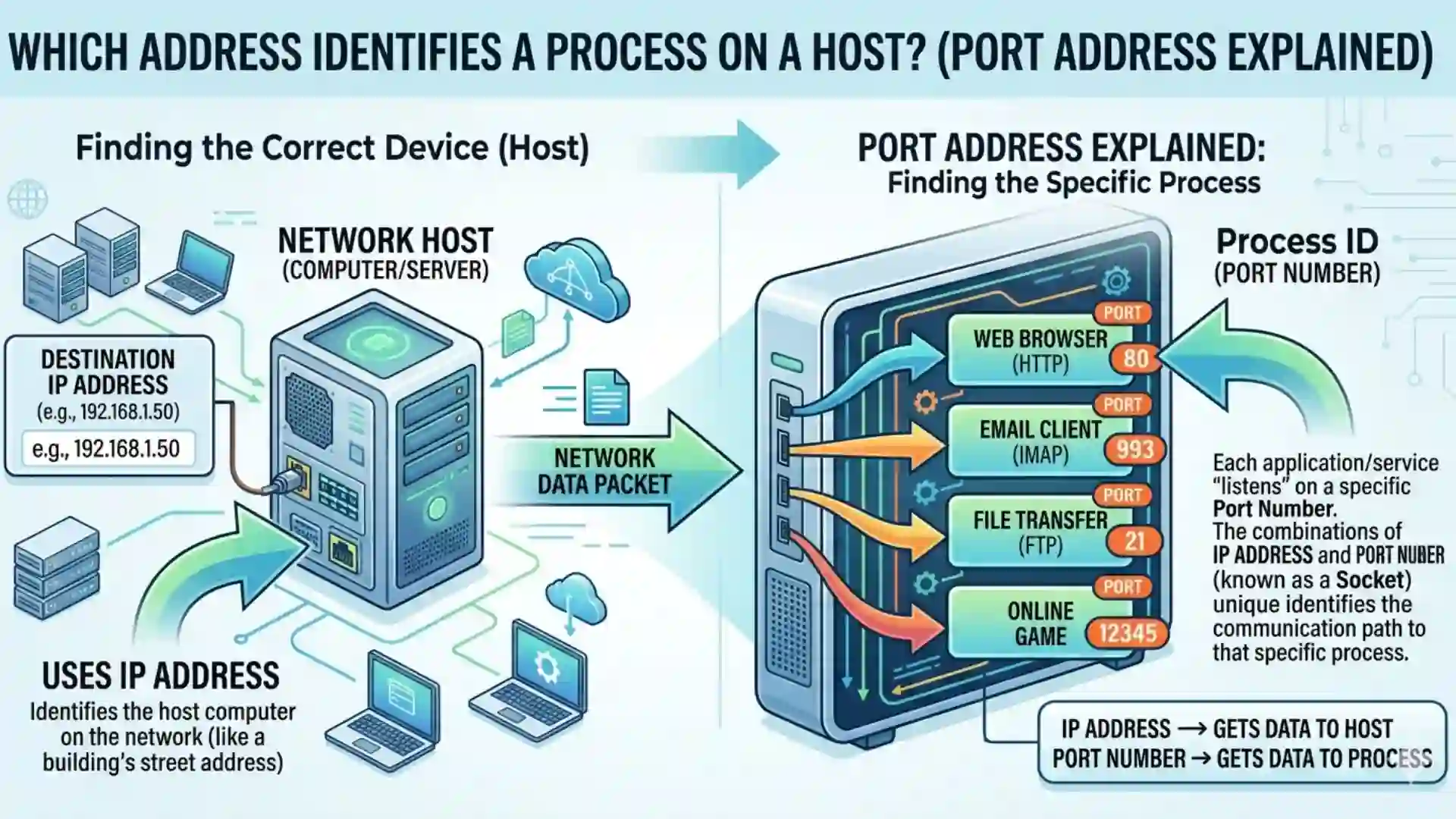
Which Address Identifies a Process on a Host?
Which Address Identifies a Process on a Host?In the vast world of computer networking, communication between devices is the backbone of modern digital systems. Whether you are browsing a website, sending an email, or using a mobile application, multiple layers of networking work together to ensure that data reaches the correct destination. One of the most important concepts in this process is identifying not just the device (host) but also the specific process or application running on that device.
This article explores in detail the concept behind the question: Which address identifies a process on a host? We will examine the answer, its significance, and how it fits into the overall networking model. By the end, you will have a deep understanding of how communication works at the process level in computer networks.
Understanding the Basics of Networking
Before diving into the main topic, it is essential to understand some foundational concepts of networking.
A computer network consists of multiple devices, also known as hosts, connected together to share resources and information. Each host in a network is identified by a unique address so that data can be routed correctly.
However, identifying a host alone is not sufficient. Modern computers run multiple applications simultaneously—web browsers, email clients, file transfer tools, and more. When data arrives at a host, the system must determine which specific application (process) should receive that data.
This is where process-level addressing comes into play.
What is a Process in Networking?
A process is simply a running instance of a program. For example:
A web browser like Chrome is a process
An email client is another process
A file transfer service is yet another process
Each process may require network communication, and therefore, the network must be able to distinguish between them.
The Key Answer: Port Address
The address that identifies a process on a host is called a Port Address.
Definition
A port address is a numerical identifier assigned to a specific process or service on a host. It allows the operating system to direct incoming data to the correct application.
How Port Addressing Works?
When data is transmitted over a network, it includes multiple layers of addressing:
Physical Address (MAC Address) – Identifies the device on a local network
Logical Address (IP Address) – Identifies the host globally
Port Address – Identifies the specific process on that host
Example
When you open a website:
Your computer uses an IP address to locate the server
The server uses a port number (usually port 80 or 443) to identify the web service
The response is sent back to your system using your IP and a specific port assigned to your browser process
Structure of a Port Address
A port address is a 16-bit number, meaning it can range from:
0 to 65535
These are divided into three main categories:
| Port Range | Type of Ports | Description |
|---|---|---|
| 0 – 1023 | Well-known ports | Reserved for standard services |
| 1024 – 49151 | Registered ports | Used by user applications |
| 49152 – 65535 | Dynamic ports | Temporary ports assigned by OS |
Common Port Numbers and Their Uses
Some port numbers are universally recognized and used by standard protocols:
| Port Number | Service Name | Description |
|---|---|---|
| 80 | HTTP | Web browsing (non-secure) |
| 443 | HTTPS | Secure web browsing |
| 21 | FTP | File Transfer Protocol |
| 25 | SMTP | Sending emails |
| 53 | DNS | Domain name resolution |
| 22 | SSH | Secure remote login |
Relationship Between IP Address and Port Address
To uniquely identify a process on a network, both the IP address and port address are used together.
This combination is called a Socket Address.
Socket Address Format
IP Address + Port Number
Example:
192.168.1.1:80
Here:
192.168.1.1identifies the host80identifies the web service process
Role of Transport Layer
The concept of port addressing belongs to the Transport Layer of the OSI model.
Responsibilities of Transport Layer:
Process-to-process delivery
Multiplexing and demultiplexing
Error control
Flow control
Protocols like TCP (Transmission Control Protocol) and UDP (User Datagram Protocol) use port numbers to ensure correct delivery of data.
TCP vs UDP and Port Usage
Both TCP and UDP use port numbers, but their behavior differs.
TCP (Connection-Oriented)
Reliable communication
Ensures data delivery
Uses port numbers for connection management
UDP (Connectionless)
Faster but less reliable
No guarantee of delivery
Still uses port numbers for process identification
Multiplexing and Demultiplexing
Port addresses enable two critical functions:
Multiplexing
Multiple processes send data simultaneously
Each data packet is tagged with a port number
Demultiplexing
Incoming data is sorted based on port numbers
Delivered to the correct application
Real-Life Analogy
Think of a host (computer) as a large office building:
The IP address is the building's address
The port number is the room or department number
Even if mail reaches the correct building, it must go to the correct room to reach the intended recipient.
Importance of Port Addressing
Port addressing is essential for several reasons:
1. Enables Multiple Applications
Without port numbers, only one application could use the network at a time.
2. Efficient Data Routing
Ensures data is delivered to the correct process.
3. Supports Client-Server Architecture
Servers listen on specific ports for incoming requests.
4. Enhances Security
Firewalls can allow or block traffic based on port numbers.
Security and Port Numbers
Port numbers play a crucial role in network security.
Open Ports
Ports that accept incoming connections
Can be vulnerable if not secured
Closed Ports
Do not accept connections
Safer but may block necessary services
Firewalls
Firewalls monitor and control traffic based on port numbers, allowing administrators to:
Block unauthorized access
Allow only trusted services
Important Information
Below is a consolidated table summarizing key networking concepts related to process identification:
| Concept | Description | Example |
|---|---|---|
| IP Address | Identifies a host | 192.168.0.1 |
| Port Address | Identifies a process | 8080 |
| Socket Address | Combination of IP + Port | 192.168.0.1:8080 |
| Transport Protocol | Handles process communication | TCP, UDP |
| Well-known Ports | Reserved standard ports | 80 (HTTP), 443 (HTTPS) |
| Dynamic Ports | Temporary ports | 50000+ |
| Multiplexing | Multiple processes sending data | Browser + Email |
| Demultiplexing | Data delivered to correct process | Web page loads |
How Port Addressing Works in Everyday Applications?
Web Browsing
When you open a website:
Your browser uses a dynamic port
Connects to server port 80 or 443
Data is exchanged using port-based communication
Email Communication
SMTP uses port 25 for sending
POP3 uses port 110 for receiving
Online Gaming
Games use specific ports to manage real-time communication between players.
Common Misconceptions
1. IP Address Alone is Enough
Incorrect. IP identifies the host, not the process.
2. Port Numbers are Random
Not entirely. Many ports are standardized for specific services.
3. Ports are Only for Servers
Clients also use ports, typically dynamic ones.
Advanced Concepts
Ephemeral Ports
Temporary ports assigned by the operating system for client-side communication.
Port Forwarding
Used in routers to direct traffic from one port to another device within a network.
NAT (Network Address Translation)
Uses port numbers to map multiple private devices to a single public IP.
Conclusion
In computer networking, communication is not just about sending data from one device to another—it is about ensuring that the data reaches the correct application within that device. While IP addresses identify hosts, they are not sufficient for complete communication.
The port address plays a critical role by identifying the specific process on a host. It enables multiple applications to operate simultaneously, supports efficient data routing, and forms the foundation of modern internet communication.
Understanding port addressing is essential for students, IT professionals, and anyone interested in networking. It not only clarifies how data flows across networks but also highlights the importance of structured communication systems in the digital world.
In summary, whenever you are asked, “Which address identifies a process on a host?”, the correct and complete answer is:
Port Address.
This simple yet powerful concept is at the heart of how the internet works today.
Frequently Asked Questions
Port address identifies the specific application or process

Verified Expert in deals and money-saving tips



No comments yet. Be the first to share your thoughts!